 Mandarin Mosaic
Free on iPhone, iPad and Android.
Download on theApp Store Get it onGoogle PlayYour first month of Premium is free.
HSK Lessons in Mandarin Mosaic: How They Work

Mandarin Mosaic has eight HSK lesson packs: Chinese Beginner Super Basics for complete beginners, one pack for each HSK level from 1 to 6, and New HSK 7–9 for the advanced band of the new HSK 3.0 standard. Each lesson is up to 10 sentences, and each sentence brings in one new word where it can (two at most), surrounded by words you already know. The app keeps track of every word you learn, so lessons never re-teach what you know, and once you've learned a level's original HSK words the same pack moves on to the extra words the New HSK lists add. To start, open Lessons on the Home screen, tap HSK Lessons and tap the pack for your level.
This guide covers the packs, choosing a level, what a lesson looks like and how your progress is tracked, using the names you'll see in the app.
The HSK packs and what they cover
At the time of writing, the HSK Lessons course has these packs, with over 10,000 sentences between them, all checked by native speakers:
| Pack | For | Sentences |
|---|---|---|
| Chinese Beginner Super Basics | Complete beginners, before HSK 1 | 62 |
| HSK1 Examples | HSK 1 words | 379 |
| HSK2 Examples | HSK 2 words | 403 |
| HSK3 Examples | HSK 3 words | 1,071 |
| HSK4 Examples | HSK 4 words | 1,861 |
| HSK5 Examples | HSK 5 words | 2,429 |
| HSK6 Examples | HSK 6 words | 3,092 |
| New HSK 7-9 Examples | The advanced band of the 2021 HSK 3.0 standard | 1,503 |
Each level pack covers both versions of the exam: its sentences teach that level's words from the original HSK 2.0 list and from the New HSK (3.0) list, all in one pack, so there's one pack per level rather than separate New HSK packs. The original HSK 2.0 words come first: an HSK 3 lesson teaches the HSK 3 words you don't know yet, the most common first. When you know nearly every original word at a level, the same pack carries on with that level's words from the New HSK list, and after those with HSK Extra, our list of common words the HSK lists leave out. The lesson preview tells you when that happens (see below). If you're not sure how the lists differ, our HSK vocabulary list compares HSK 2.0, the 2021 standard and the 2025 syllabus.
Lessons also has other courses, such as Everyday Chinese: 21 topic packs, from small talk to taking a train, which aren't tied to an HSK level.
Choosing your level
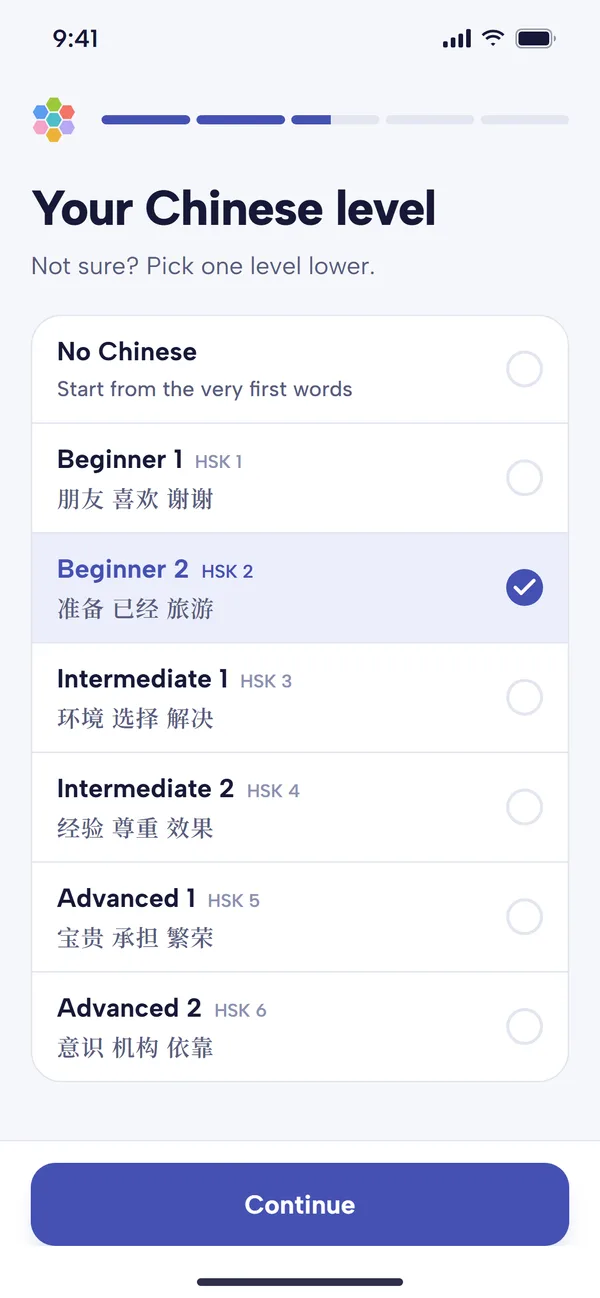
When you first open the app, Your Chinese level offers seven choices: No Chinese, then Beginner 1 (HSK 1) up to Advanced 2 (HSK 6). Each row shows three words from that level; Beginner 1, for example, shows 朋友 (péngyou, friend), 喜欢 (xǐhuan, to like) and 谢谢 (xièxie, thank you). Pick the highest level whose words you can read. As the screen says: not sure? Pick one level lower.
Your choice does two things:
- It sets your starting vocabulary. The app counts the words up to that level as known, so your first sentences aren't full of words you've already learned. Words at the level you picked start out weakest, so they come back for review first, and anything you've forgotten soon shows.
- It picks your first pack. The You're all set screen shows the pack Recommended for your level, such as HSK2 Examples for Beginner 2, or Chinese Beginner Super Basics for No Chinese, with a Start first lesson button.
If you don't know your level, try our free Chinese level test, or paste a text you can read into the HSK level checker to see which levels its words come from.
Changing level later
You're never locked into a level. Tap any pack in HSK Lessons to study it; the words you know carry across every pack, so moving up just means starting the next one. If your starting level was badly wrong, Settings has Reset vocabulary, which starts again from a level you choose. It erases your known words, so use it only as a last resort; marking words Known as you meet them is usually better (see below).
Finding the HSK lessons
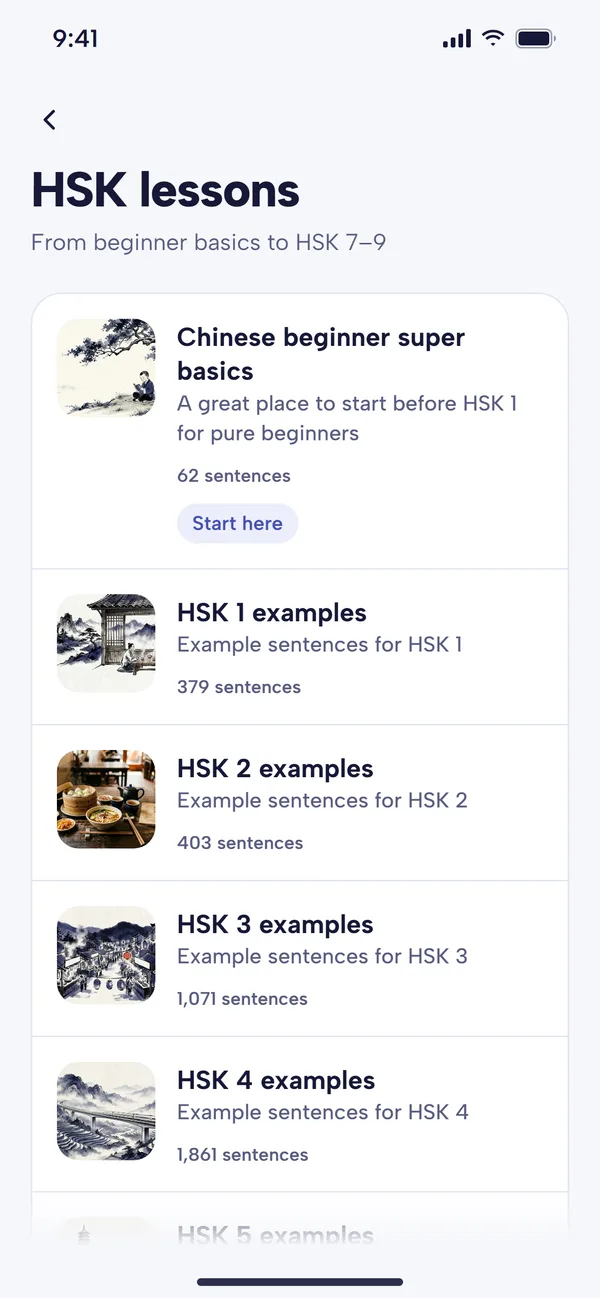
A new learner sees Start here on the first pack. 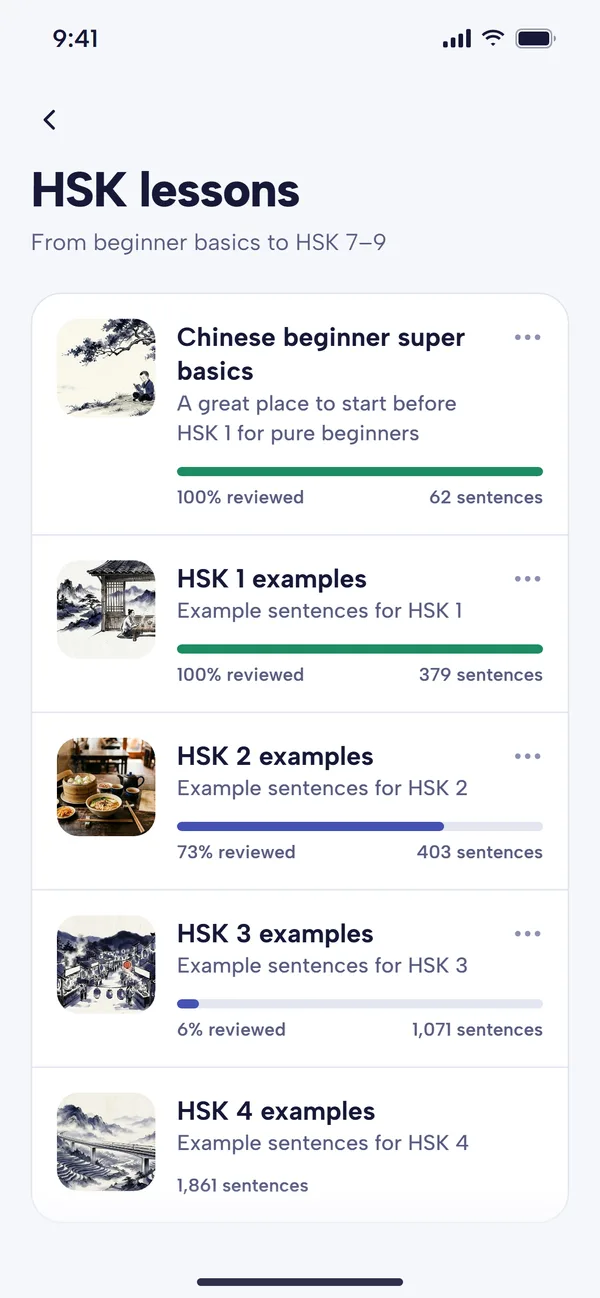
Started packs show how much of them you've reviewed.
On the Home screen, tap Lessons. On the free plan, the card at the top shows how many free lessons you have left today and your streak; with Premium it shows just the streak. Under Choose a course, tap HSK Lessons. The packs are listed in level order, and each row shows:
- the pack's picture, name and a one-line description;
- how many sentences it has;
- once you've started it, a bar showing the share of its sentences you've had in lessons, such as "73% reviewed".
Until you've started an HSK pack, the first one is tagged Start here. Tap a pack to start a lesson. The first time, its sentences download (the row shows "Downloading" and a percentage), so start your first lesson on Wi-Fi if you can; after that they're on your phone. On a pack you've started, the three dots offer Reset progress, which takes the pack back to 0% and keeps your known words.
Once you've chosen a pack, you don't need to come back here each day: the Continue where you left off card on Home has a Start lesson button for your current pack.
Before you start: the lesson preview
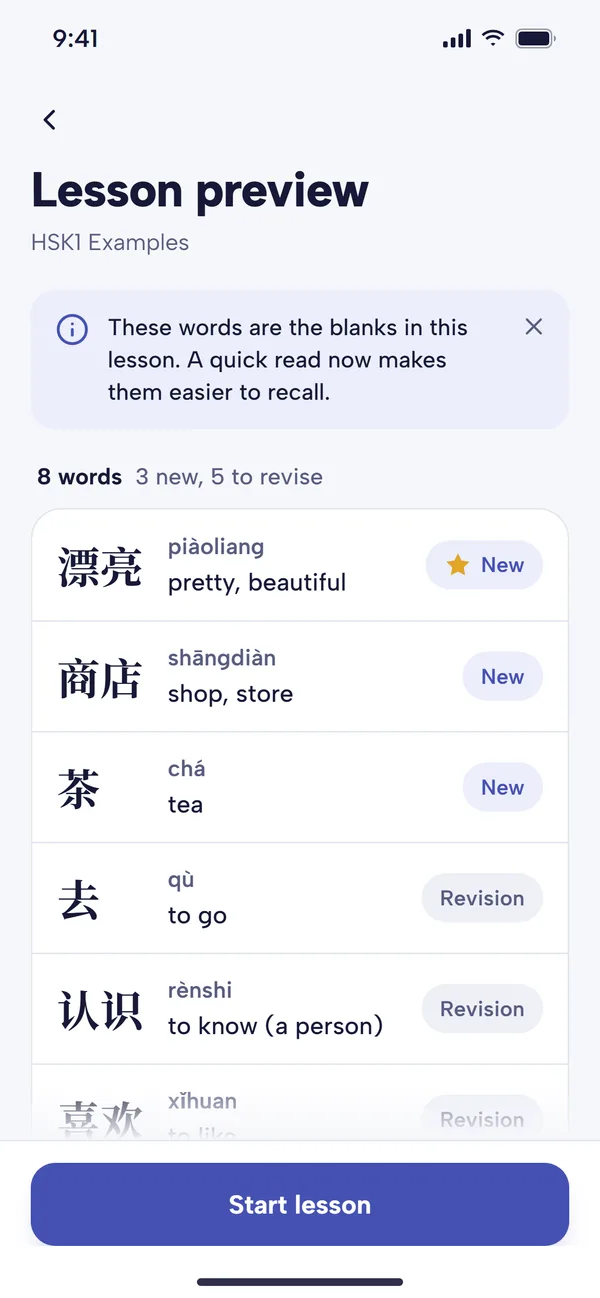
Every lesson opens on Lesson preview: the words that will be blanked out in this lesson, with their pinyin and meaning.
- The line under the title gives the pack and a count, such as "8 words, 3 new, 5 to revise".
- Each word is marked New (an HSK word you haven't learned yet) or Revision; a word on your focus list is marked Focus word (see focus words).
- Tap a word to hear it and see its full entry.
- When a pack has moved on to New HSK or HSK Extra words, a Why these words? card explains it, for example that you already know every word on the original HSK 3 list.
A quick read here makes the blanks easier to recall. Tap Start lesson when you're ready. If a pack has nothing left for you today, the preview says "Nothing left in this pack today" and offers Choose another pack.
How a lesson runs
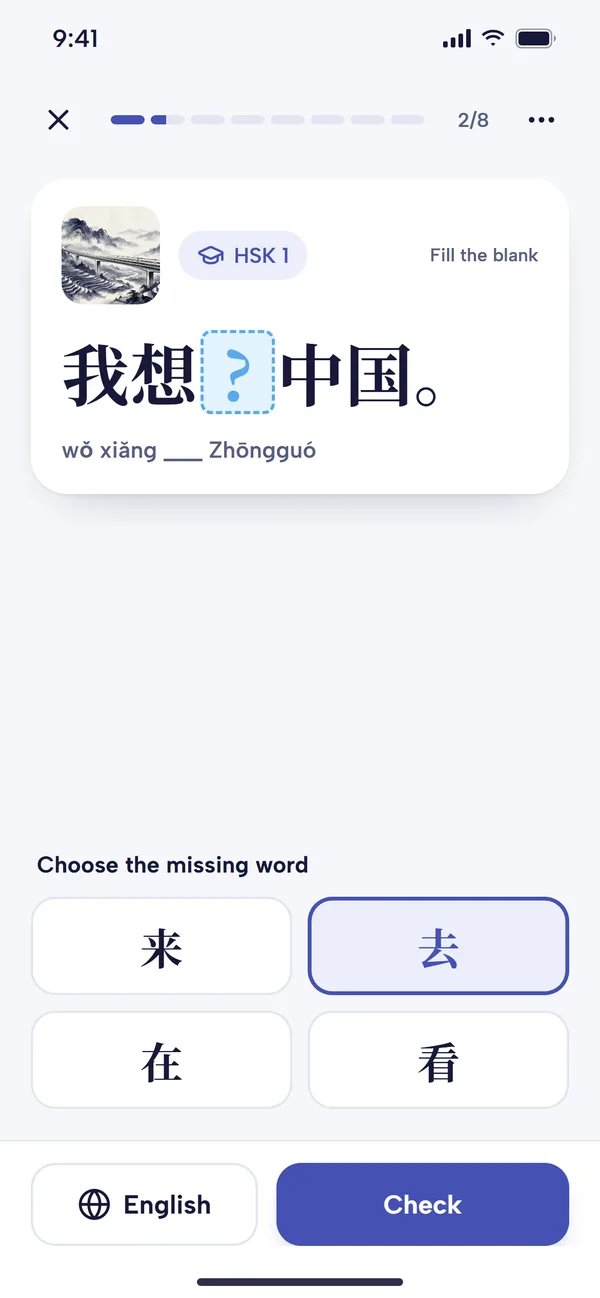
Choose the missing word, then tap Check. 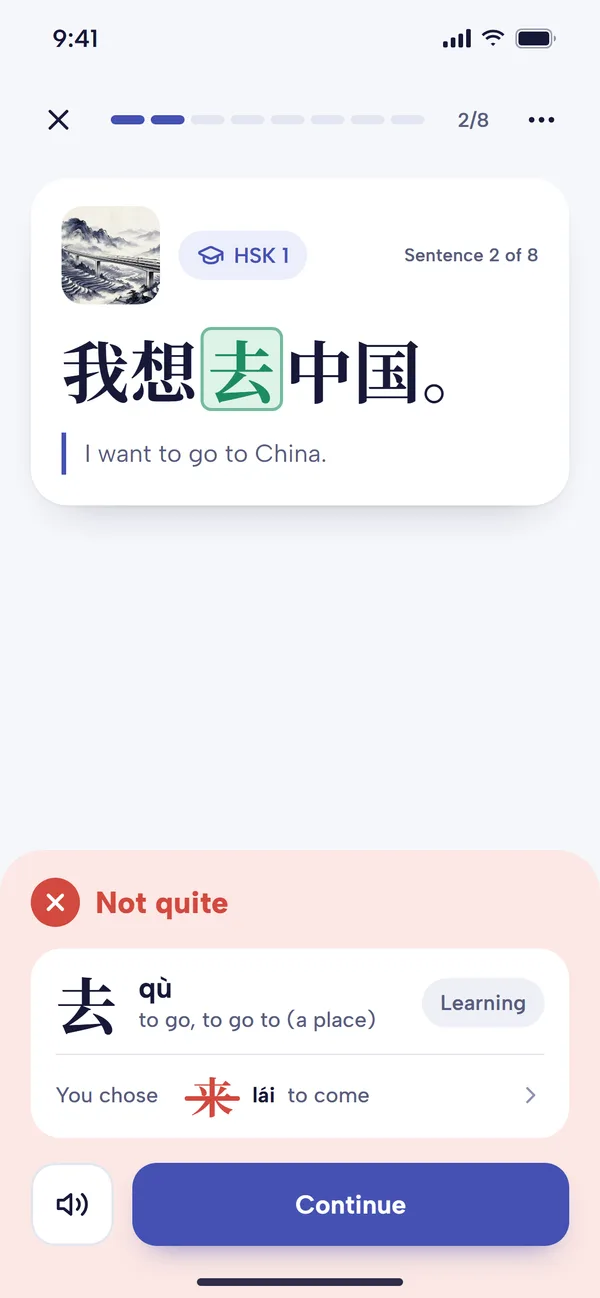
After a wrong answer: the right word, and the one you chose.
A lesson is a short run of sentences, up to 10, with the bar at the top showing how far you've got. Each sentence card has a small picture, the sentence's HSK level and the Chinese with one word blanked, such as 我想__中国 (wǒ xiǎng ___ zhōngguó, I want to ___ China).
- Answer: under Choose the missing word, pick one of four, then tap Check. If you'd rather recall it without choices, turn on Type word answer in Settings and type the word in Chinese characters (you'll need a Chinese keyboard; see how to type in Chinese).
- Get help if you need it: English shows the translation, and you can tap any word in the sentence for its pinyin, meanings, HSK level and audio. The pinyin line under the sentence can be turned off in Settings, Show sentence pinyin.
- See the result: a green Correct or red Not quite panel shows the right word with its pinyin and meaning, and where you are with it, such as "Learning 1/3" or "Known". After a wrong answer it also shows the word you chose. The speaker button plays the whole sentence; Continue moves on.
The three dots at the top open Rate this sentence (see it more often, or never again), Report a problem (please do, if the English, Chinese or picture looks wrong), Change voice, Chinese font, Show or Hide pinyin, and Help. If you leave in the middle, the app saves your place, so you can carry on from the same sentence.
How the app chooses which word to blank, and why recalling it works better than recognising it, is in our guide to cloze tests. If you'd rather just read whole sentences, set Lesson type in Settings to Free reading.
When the lesson ends
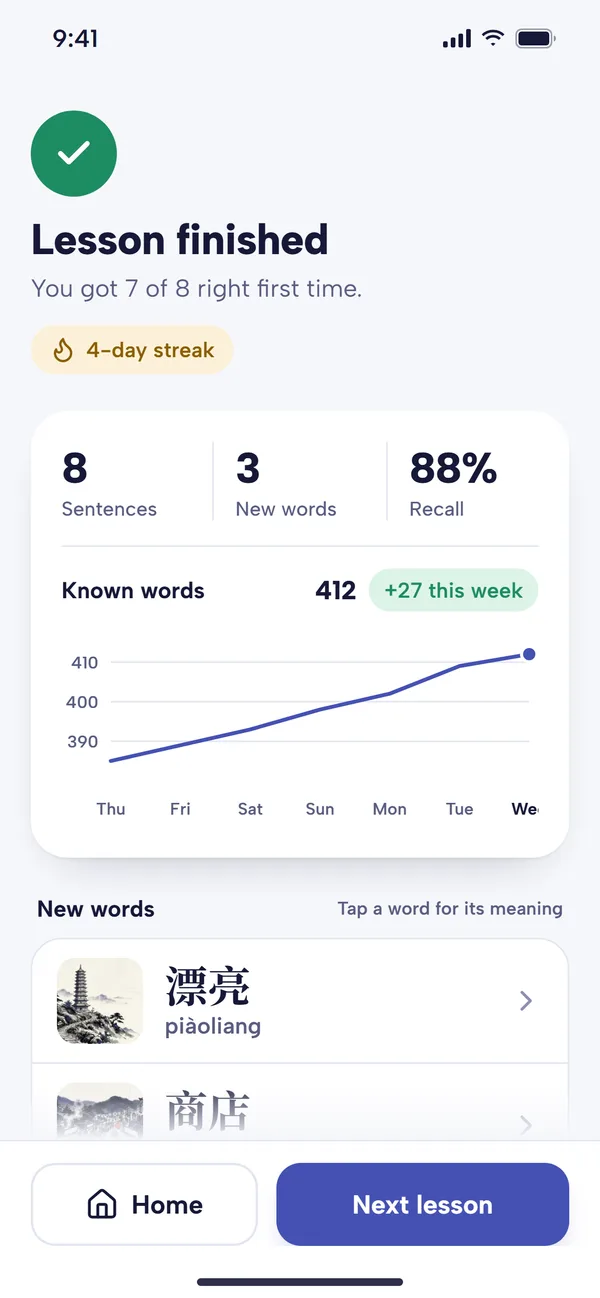
The Lesson finished screen sums up the lesson:
- how many you got right first time, such as "You got 7 of 8 right first time";
- your streak, once it's two days or more;
- how many sentences you did, and how many words were new or revised;
- your total of Known words, with a chart and a gain such as "+27 this week" when the total has changed;
- lists of the New words and Revised words; tap one for its meaning.
Next lesson starts another lesson from the same pack, and Home takes you back.
How your HSK words are tracked and reviewed
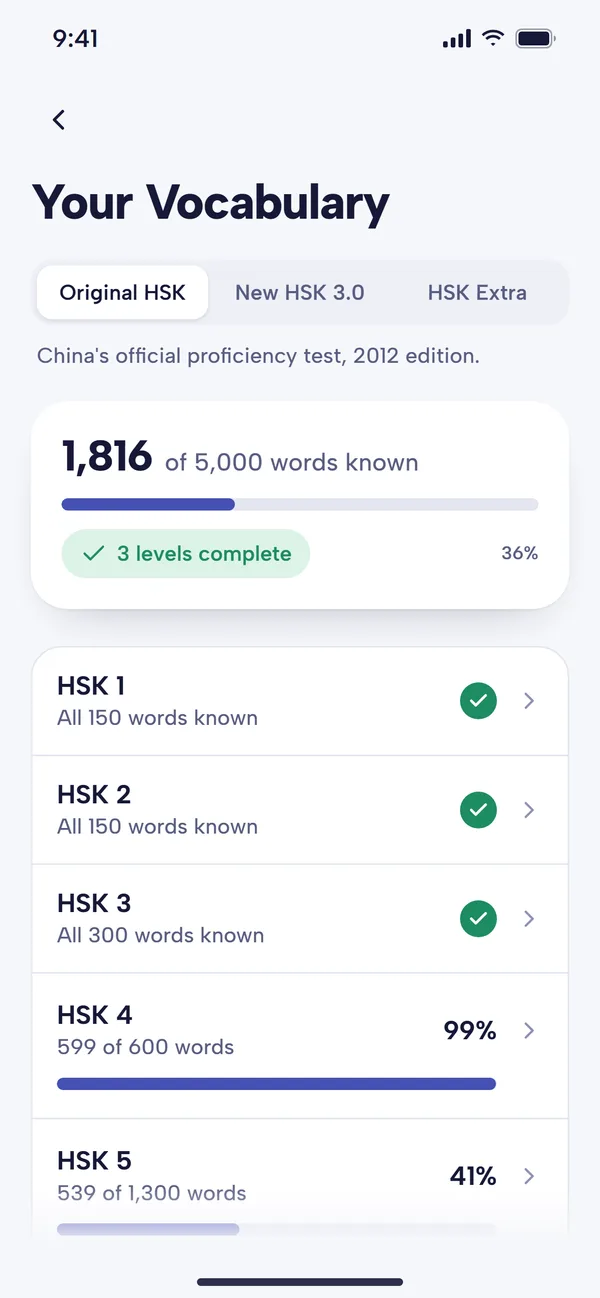
A new word becomes Known after you answer it right three times. You can change the number in Settings, Guesses to mark as known. You can also tap any word and switch it between Learning and Known yourself: mark the ones you already knew, and send back any you've forgotten.
To see where you stand, open Your Vocabulary on Home, under Practice and progress. Choose Original HSK, New HSK 3.0 or HSK Extra at the top to see how many of that list's words you know, and your progress through each level; tap a level for its words to learn and words known. Stats also shows your estimated HSK level. Our custom packs guide goes through Your Vocabulary in more detail.
Known words don't disappear. They come back in Words to review (under Review Lessons in Lessons) at growing intervals, in sentences from your packs. How those reviews are scheduled, and how to stop them piling up, is in our spaced repetition guide.
Free plan and Premium
At the time of writing:
- Free plan: every HSK pack is open. You get a daily allowance of lessons: one a day for most new accounts (accounts from before September 2026 keep three). Review and focus lessons count towards it too, and a lesson counts once you finish it. The Lessons screen shows how many you have left today.
- Premium: as many lessons a day as you like, plus the rest of Premium, such as syncing between devices.
Premium's first month is free. See pricing for current details.
A daily routine with the HSK lists
- Look over your level's list. Skim the topic tables on our list for your level, from HSK 1 to HSK 6, so the new words in lessons feel familiar.
- Clear Words to review first, then do a lesson or two from your level's pack. Glance at the preview before each one.
- Tap freely. Look up any word you're unsure of, and add the ones that won't stick to Focus Words.
- Keep Known honest. If a "known" word catches you out, switch it back to Learning.
- Move up when the pack does. When the preview starts explaining that you know nearly every word at the level, start the next level's pack.
At ten new words a day, HSK 3 (600 words in all) takes about two months from scratch. Our sentence mining guide explains why learning words in sentences works, and how to use Mandarin Mosaic covers the rest of the app.
Common questions
Does the app use HSK 2.0 or HSK 3.0?
Both. The level packs follow the original HSK 2.0 lists first, then add each level's New HSK (2021 standard) words once you know the original ones, and the New HSK 7–9 pack covers the advanced band. Your Vocabulary tracks you against both lists.
Can I start at HSK 4 if I already know some Chinese?
Yes. Pick your level when you first set up the app, or just tap a higher pack. The app teaches the words you don't know, so if you already know most of HSK 3, the HSK3 Examples pack will mostly show you the few you've missed.
Will the HSK lessons prepare me for the exam?
They teach the vocabulary and give you reading and listening practice with every sentence's audio. They don't include mock papers, writing practice or speaking, so if you're sitting the test, add past papers closer to the date. Our post on whether to take the HSK explains what each level tests.
Is there an HSK app on the web?
No. Mandarin Mosaic is an app for iPhone and Android phones; there's no web version.