 Mandarin Mosaic
Free on iPhone, iPad and Android.
Download on theApp Store Get it onGoogle PlayYour first month of Premium is free.
How Focus Words Work in Mandarin Mosaic

Most of the time, Mandarin Mosaic decides which words you learn and review. Focus Words let you choose for yourself: pick any word, and the app builds lessons around it using sentences from all your packs. This guide covers how to add focus words, how to study them, and how to keep your list useful.
What are focus words?
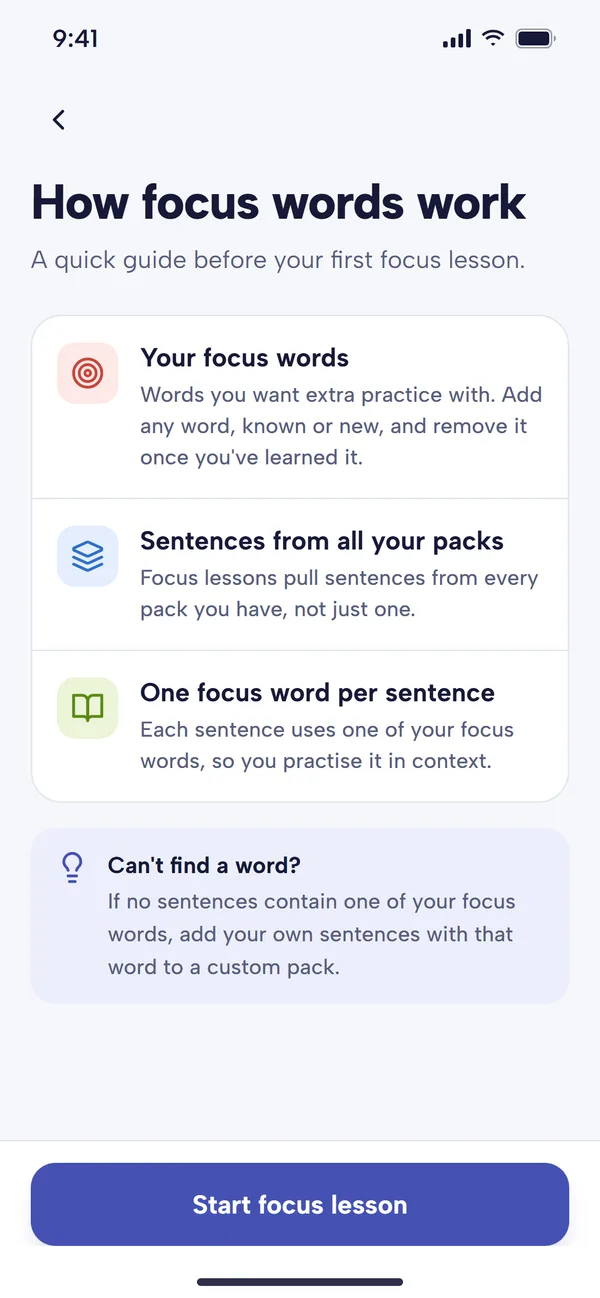
Focus words are words you want to pay special attention to. You can add any word, whether it's new to you or one you already know, and remove it once you feel you've practised it enough. Your focus words get:
- their own lesson, Focus Words, under Review Lessons
- priority in HSK pack lessons
- priority in Words to review, when they're due
When focus words help
- A word you keep getting wrong. If 麻烦 (máfan, trouble; to bother) trips you up every time, make it a focus word and you'll meet it in a run of different sentences.
- Words from your own life. Something you heard in a drama, read in a message or need for work.
- Exam preparation. Add the words from a textbook chapter or HSK list you're revising.
- Words you've just looked up. Seeing a word in several sentences soon after meeting it gives it the repeated exposure it needs to stick.
How to add focus words
From the Focus Words screen
- On the Home screen, tap Focus Words.
- Tap Add focus word at the bottom of the screen.
- Choose Add by English to search in English and pick the Chinese word from the results, or Add by Chinese to type the word in characters.
Focus words have to be Chinese, so if you only know the English, use Add by English and choose the right word from the list.
While you study
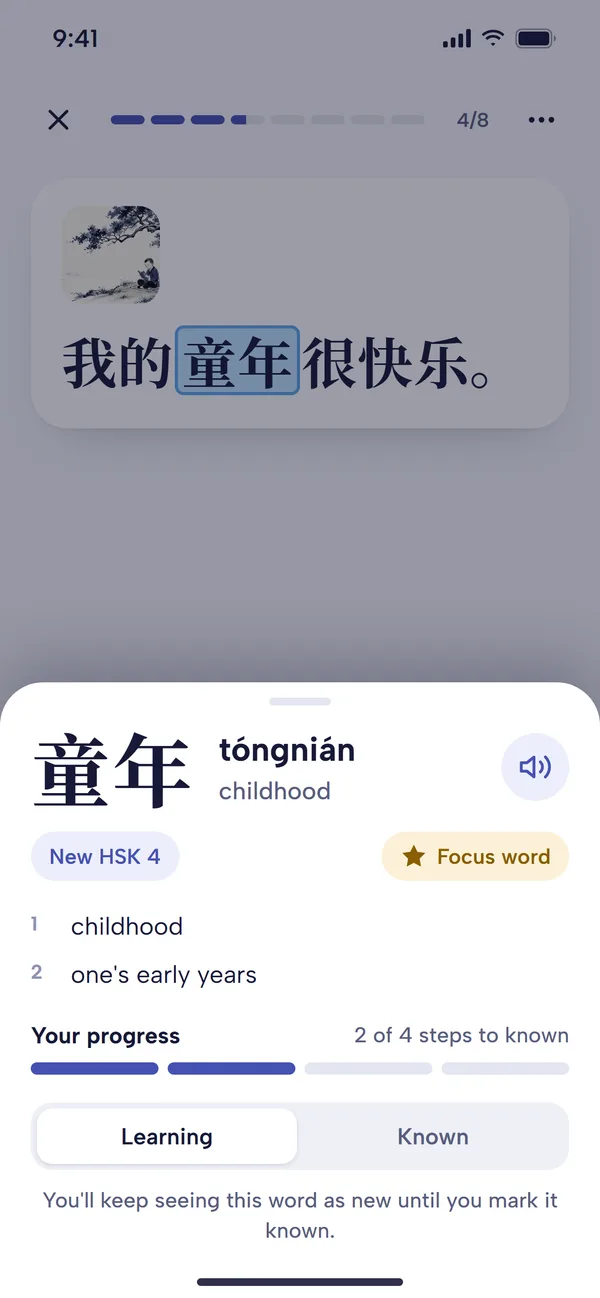
Tap any word in a lesson to open its definition, then tap Add to Focus Words under the word. The pill turns gold and reads Focus word once the word is on your list; tap it again to remove it. This is the quickest way to collect words as you go.
How to study your focus words
- From Home, tap Lessons. Under Review Lessons, tap Focus Words ("Sentences containing the focus words you've added"). You can also tap Practise focus words at the top of the Focus Words screen.
- The first time, a short guide explains how focus lessons work. Tap the button at the bottom to carry on.
- The Lesson Preview lists the focus words you'll practise. Tap Start lesson.
- Each sentence features one of your focus words, and that word is the blank. Choose (or type) the missing word and tap Check, as in any cloze lesson.
Focus lessons draw sentences from every pack you have, not just one, so you see each word in fresh contexts. Once a focus word has come up, it rests for 12 hours before a focus lesson will offer it again, so if you have only a few focus words, a second lesson on the same day may be short or have nothing to offer until later.
Do focus words get highlighted?
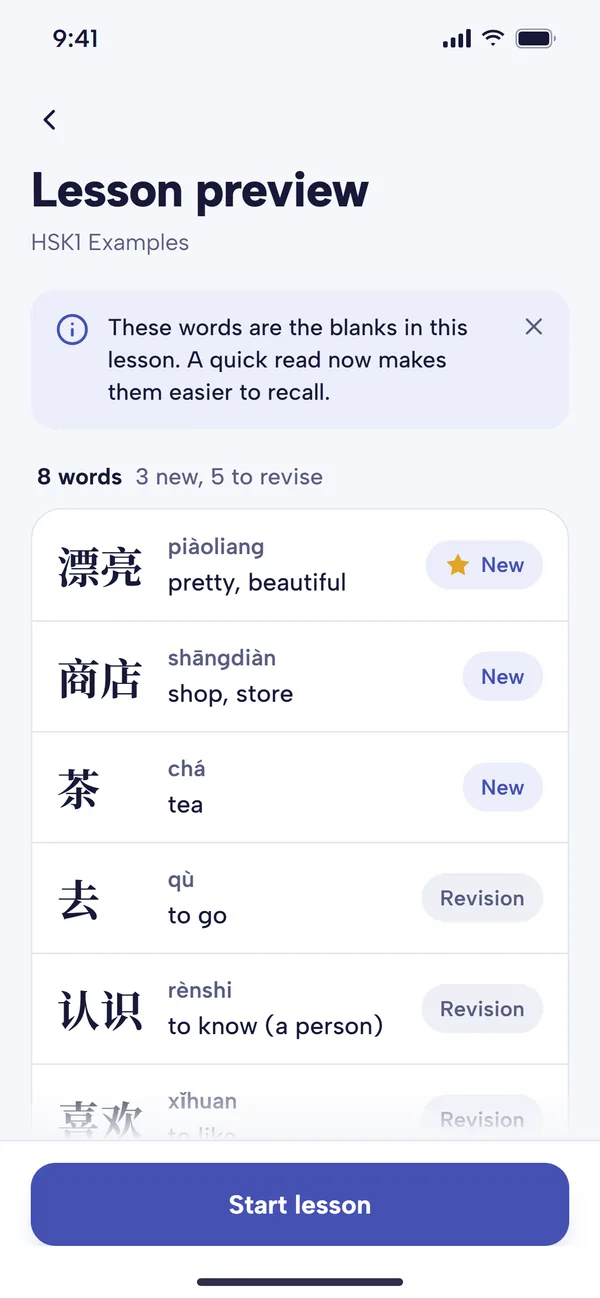
Not on the default lesson screen: the focus word is simply the blank you fill in, and the Lesson Preview marks it with a gold star. In Free reading, where nothing is blanked, the focus word is highlighted in the sentence instead.
Choosing which focus words come first
Tap the three dots on the Focus Words tile under Review Lessons to open Focus Review. Its Review order setting decides which of your focus words each lesson uses first:
- Word frequency (the default): the most common words first.
- Oldest first: the words you haven't seen for the longest.
- Hardest first: the words you get wrong most often. Newly added words count as the hardest.
- Newest first: the words you added most recently.
- Random: a different order each lesson.
The Next up strip underneath shows which words your chosen order will bring up first, so you can check it does what you want.
Managing your list
The Focus Words screen shows how many focus words you have. Tap any word for its definition and options, including the Focus word pill to remove it. The options button at the top of the screen opens Focus word options:
- Sort: list your words by Recently added or Most common.
- Manage: remove every focus word that's now Known in one go, which is handy after a few weeks of practice.
Is there a limit to how many focus words I can add?
At the time of writing, the free plan allows up to 10 focus words, and Premium allows as many as you like. On the free plan, a Focus Words lesson also counts as your one lesson for the day. See pricing for current details.
Tips for using focus words well
- Keep the list short and current. Twenty words you're actively working on beat two hundred you added months ago. Remove words once they feel easy.
- Do a focus lesson most days while you're working on a set of words, then let normal reviews take over.
- Add words as you read. Tapping Add to Focus Words during lessons and in Chinese Articles is the easiest way to build a list that reflects what you actually meet.
- Pair them with your own sentences. For a word that matters to you, add a sentence or two with it to a custom pack.
Common questions
What if none of my packs has a sentence with my focus word?
Then the word can't appear in a focus lesson. Add your own sentence containing it to a custom pack, or use the Sentence Generator on the Home screen to create one and save it to your pack.
Should I remove focus words once I know them?
Yes, usually. Once a word is known it stays in your normal spaced repetition reviews, so removing it from Focus Words doesn't mean you'll stop seeing it. It just frees your focus lessons for the words that still need work.
Can a focus word be a word I already know?
Yes. Focus words can be known or unknown. Adding a known word is a good way to get extra practice with one you find slippery.