 Mandarin Mosaic
Free on iPhone, iPad and Android.
Download on theApp Store Get it onGoogle PlayYour first month of Premium is free.
Best Chinese Flashcard App: 6 Apps for Mandarin Compared

The best Chinese flashcard app depends on what you want from it, but one thing matters more than any feature list: whether the app teaches words on their own or inside sentences. Chinese words change meaning and role with the words around them, so a card that shows you a whole sentence teaches far more than one that shows a lone character. This guide explains why, then compares six apps honestly, including our own, so you can pick the right one (or the right pair).
Why Context Matters So Much in Chinese

Ever memorised a Chinese word perfectly, only to freeze when you try to use it in a sentence? That's the limit of learning words in isolation. In Mandarin, context does a lot of work: the same character can be a verb, a noun or a grammar word depending on what surrounds it, and a few characters (like 了, 行 and 长) even change their pronunciation.
So learning words one by one can give you a false sense of progress. You might recognise hundreds of characters and still be unable to put them together to say anything.
Learning each new word inside a sentence you can mostly understand fixes this. You pick up the word's meaning, the words it goes with and its place in the sentence all at once. Sentence miners call this "i+1": everything you already know, plus one new thing. The term comes from linguist Stephen Krashen's idea of input pitched just above your current level.
Word Cards vs Sentence Cards
Here's how the two kinds of flashcard app compare.
| Feature | Word-based apps | Sentence-based apps |
|---|---|---|
| Learning unit | A single word or character (e.g. 学) | A full sentence with one new word (e.g. 我想学中文, wǒ xiǎng xué zhōngwén, I want to learn Chinese) |
| Main skill trained | Recognising a word and recalling its meaning | Understanding words as they're used |
| Grammar | Learned separately, or not at all | Picked up from repeated sentence patterns |
| Using the word | You know what it means, but not what goes with it | You see the words it combines with every time you review it |
| Speed | Fast to review, so good for cramming a word list | Slower per card, but each card teaches more |
Word cards still have a place, for example when you need the vocabulary for a test next week. But if your aim is to understand and use Chinese, sentence cards are the better default.
Why Traditional Flashcards Fall Short for Chinese
Many of us start learning Mandarin with a stack of flashcards: Chinese on the front, English on the back. The pile of "known" words grows quickly, and it feels like progress.
Then you try to read a paragraph or say a simple sentence and find that knowing the words isn't enough. You can name the parts but you can't put them together.
This gap between recognising words and using them is a big part of the intermediate plateau that so many learners hit.
One Word, Several Jobs
Take 会 (huì). A basic flashcard will probably tell you it means "can" or "will". But in real sentences it does different jobs:
我会说中文(wǒ huì shuō zhōngwén): "I can speak Chinese", a skill you've learned.明天会下雨(míngtiān huì xiàyǔ): "It will rain tomorrow", a prediction.我们开个会(wǒmen kāi ge huì): "Let's have a meeting", where it's a noun.
A front-and-back card can't show you these differences. Sentences can, which is why even the best flashcard app for Chinese needs to go beyond single words.
What Word Cards Leave Out
Spaced repetition is a very efficient way to remember things (see what spaced repetition is and why it works), but it can only schedule what's on the card. With single words you miss:
- Context: you never learn when to use
是(shì) and when在(zài), because you've only seen them on their own. - Sound in a sentence: you might know a word's tones, but not how it sounds in connected speech, including tone changes such as 不 (bù) becoming bú before a fourth tone.
- Grammar: word order, particles and measure words only show up in sentences.
How Sentence Mining Helps
The fix is sentence mining: learning each new word inside a sentence you can already mostly understand.
Say you already know 我喜欢 (wǒ xǐhuan, I like) and 中国 (zhōngguó, China). A good card for you would be 我喜欢中国文化 (wǒ xǐhuan zhōngguó wénhuà, I like Chinese culture). Because you understand the rest of the sentence, you can work out that 文化 (wénhuà) means "culture", and that small moment of working it out helps it stick.
Over hundreds of sentences, you also absorb word order and particles without having to memorise every rule, and you avoid mapping English grammar onto Chinese.
You can mine sentences by hand in Anki, but finding sentences at the right level, making the cards and keeping track of what you know is slow. Our guide to sentence mining covers both the manual method and how an app can automate it.
The Best Chinese Flashcard Apps, Compared
Here are six apps worth considering, with their strengths, limits and prices at the time of writing. We make the first one, so weigh that entry accordingly; the second is our sister app.
1. Mandarin Mosaic
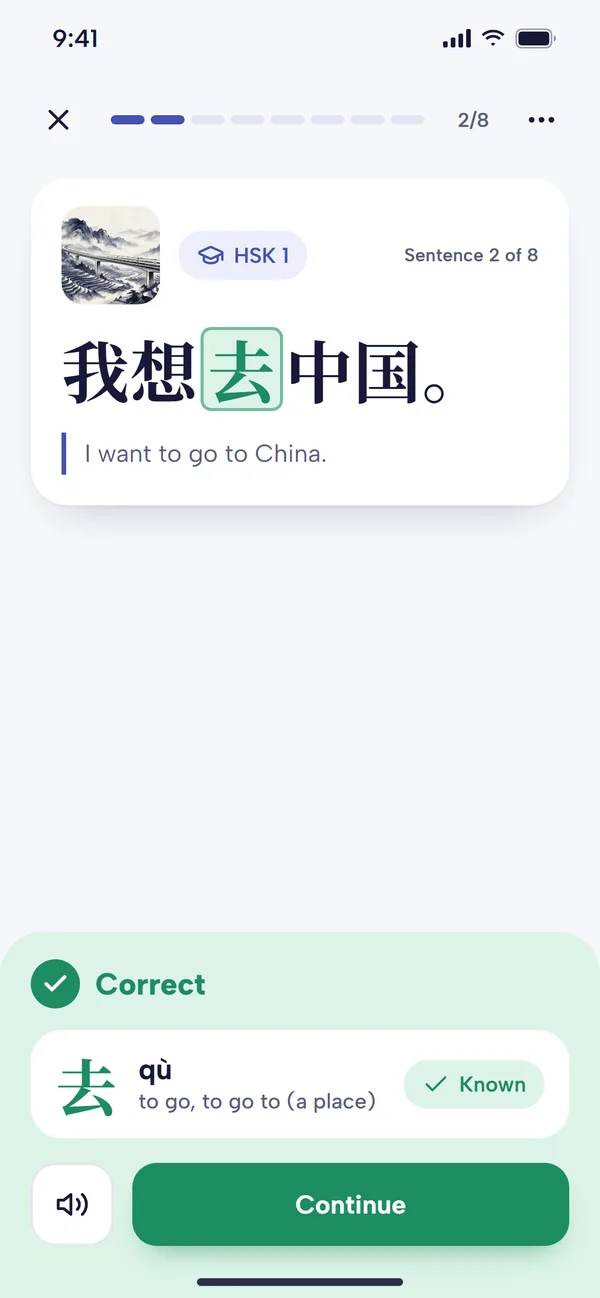
Mandarin Mosaic is a sentence-mining app for iOS and Android. It keeps track of the words you know and builds lessons from sentences with one new word where possible (at most two in the HSK packs and review lessons). The new word is blanked out as a fill-in-the-blank (cloze) question, so you recall it from the sentence around it rather than just reading it. Tap any other word for its pinyin, meaning and lifelike text-to-speech audio. Spaced repetition then brings words back in fresh sentences just before you're likely to forget them.
It comes with HSK-levelled sentence packs, every built-in sentence verified by a native speaker, plus Simplified and Traditional characters, a graded Chinese articles reader, Focus Words for words you want extra practice on, and custom packs for sentences you mine yourself. You can import Anki decks, CSV and text files (see how to import Anki decks).
- Best for: Learners who want sentence mining without building their own cards, Anki users tired of the setup, and anyone stuck at the intermediate plateau.
- Pros: One new word per sentence, cloze questions and spaced repetition in one app; verified sentences; imports your existing decks.
- Cons: Phone only (no web or desktop version); audio is text-to-speech rather than human recordings; no speaking, handwriting or dictionary search features.
- Pricing: A 30-day free trial, then a limited free plan (1 lesson a day, 10 focus words, 1 custom pack, 10 custom sentences, no sync) or Premium from £7.92 a month billed yearly (£11.95 monthly) at the time of writing.
- Website: mandarinmosaic.com
2. Chunking Chinese (speaking fluency trainer)
Chunking Chinese isn't a classic flashcard app: it's a speaking trainer. But it uses the same engine underneath, spaced repetition, and applies it to the thing flashcards are worst at: actually saying things. Instead of single words, it drills reusable chunks, short phrases such as 我想问一下 (wǒ xiǎng wèn yíxià, "I'd like to ask") and 在哪里 (zài nǎli, "where is"), and then has you combine them into new sentences out loud.
A short placement sets your level between HSK 1 and HSK 5. Each daily session, about fifteen minutes, introduces a few new chunks with a shadowing step, brings back earlier ones for review, and then gives you English prompts to answer by speaking Chinese. It scores the sound and tone of each character you say. It runs in the browser, including on your phone, and you can type instead of speaking when you can't talk out loud. Our Chunking Chinese review covers it in detail.
- Best for: Learners who understand more than they can say and want daily speaking practice with feedback on their tones.
- Pros: Makes you produce whole sentences, not just recognise them; per-character tone and sound scores; short daily sessions.
- Cons: Speaking only, so it doesn't teach reading or writing; not for complete beginners (it assumes some pinyin and basic vocabulary); places open from a waiting list.
- Pricing: A 7-day free trial, then $30 a month at the time of writing.
- Website: chunkingchinese.com/app
3. Anki
Anki is the most powerful and flexible flashcard app there is. You can download shared Chinese decks or build your own, design any card layout, and add Chinese-specific add-ons such as Chinese Support 3 (pinyin and tone colouring) and HyperTTS (audio). It offers the modern FSRS scheduler, and image occlusion has been built in since Anki 23.10. If you want to mine sentences by hand, this is the classic tool for it.
The cost is time: setting it up well for Chinese takes effort, and making good cards is a job in itself. Our post on why Anki is hard for Chinese covers the common problems, and our list of Chinese Anki decks will save you some of the work.
- Best for: Learners who like control and don't mind tinkering.
- Pros: Free on desktop, web and Android; endless customisation; huge library of shared decks.
- Cons: Steep learning curve; Chinese needs add-ons for pinyin and audio; the quality of shared decks varies.
- Pricing: The desktop app (Windows, Mac, Linux), AnkiWeb and AnkiDroid (Android) are free. AnkiMobile for iPhone and iPad is a one-off £24.99 on the UK App Store at the time of writing. See is Anki free?
- Website: apps.ankiweb.net
4. Pleco (Flashcard System add-on)
Pleco is the standard Chinese dictionary app, and its paid Flashcard System add-on turns it into a capable flashcard app too. Any word you look up can go into a flashcard deck with one tap, complete with its dictionary entry, and the add-on has its own spaced repetition and several test types. Because lookup and review live in the same app, it's very quick to save words you meet while reading. Our Pleco review has the add-on prices.
- Best for: Learners who already use Pleco and want to review the words they look up.
- Pros: Excellent dictionary data; fast card creation; works offline.
- Cons: Cards are mostly single words, so you'll need to add example sentences yourself; the settings can be overwhelming.
- Pricing: The dictionary is free. Flashcards are a one-off paid add-on, also included in the Basic Bundle (£29.99 on the UK App Store at the time of writing).
- Website: pleco.com
5. Skritter
Skritter is a flashcard app for writing. You write each character on the screen, stroke by stroke, and it corrects your stroke order and schedules reviews with spaced repetition. It has word lists for the HSK levels and popular textbooks, and you can make your own.
- Best for: Learners who want to be able to write characters by hand. See our guide to handwriting in Chinese.
- Pros: The best handwriting practice available; good lists for HSK and textbooks.
- Cons: A subscription for one skill; teaches characters and words rather than how to use them in sentences.
- Pricing: Limited free access; subscriptions roughly £10-£15 a month on the UK App Store at the time of writing, less on longer plans.
- Website: skritter.com
6. Quizlet
Quizlet is a general flashcard app with a huge library of user-made sets, including many for Chinese textbooks and HSK lists. It's quick to start and easy to share sets with a class, which is why many teachers use it.
- Best for: Students who need to learn a class vocabulary list quickly.
- Pros: Easy to use; many ready-made sets; games and test modes.
- Cons: Not made specifically for Chinese, and its text-to-speech can get tones wrong; not built around long-term spaced repetition the way Anki is; many features need a subscription.
- Pricing: Free with ads and limits; Quizlet Plus costs $35.99 a year in the US at the time of writing (UK prices vary).
- Website: quizlet.com
For a closer look at the last two, see Quizlet vs Anki.
At a Glance
| App | Card type | Best for | Platforms | Price at the time of writing |
|---|---|---|---|---|
| Mandarin Mosaic | Sentences with one new word, as cloze questions | Sentence mining without the setup | iOS, Android | 30-day free trial; free plan (1 lesson a day) or Premium from £7.92/month billed yearly |
| Chunking Chinese | Spoken chunks and sentences | Speaking and tones | Browser (phone or computer) | 7-day free trial, then $30/month (waiting list) |
| Anki | Anything you build | Full control | Windows, Mac, Linux, web, Android, iOS | Free; AnkiMobile £24.99 one-off |
| Pleco | Dictionary entries | Reviewing words you look up | iOS, Android | Free dictionary; paid flashcard add-on |
| Skritter | Handwritten characters | Writing | iOS, Android, web | Subscription |
| Quizlet | Word lists | Class vocabulary | iOS, Android, web | Free with limits; Quizlet Plus $35.99/year (US) |
How to Choose a Chinese Flashcard App

Start with your goal. If you want to read and understand Chinese, choose an app built around sentences. If you need to pass a vocabulary test soon, a word list app will do. If speaking is the problem, you need practice that makes you produce Chinese out loud, which most flashcard apps don't do.
Then check these:
1. Spaced repetition
A good spaced repetition system (SRS) shows you difficult cards more often and easy ones less, so you spend your time where it's needed. Every app on this list has one except Quizlet, which isn't built around it. Our guide to spaced repetition in Mandarin Mosaic shows how one works in practice.
2. Sentences or single words
Does the app show new words inside sentences you can understand? For Chinese, this makes a bigger difference than any other feature.
3. How much work the cards take
If you spend more time making flashcards than studying them, the app isn't working for you. Ready-made, levelled content saves hours; making your own cards gives you control. Decide which you value more.
4. Audio
Native-speaker recordings are ideal. Modern text-to-speech voices are good for standard Mandarin and can read any sentence, but older or general-purpose voices (like those in non-Chinese apps) sometimes get tones wrong. Listen to a few cards before you commit.
5. Lookups
Can you tap a word to see its pinyin and meaning without leaving the card? Switching to a separate dictionary for every unknown word breaks your flow.
Which App Suits Which Learner?
Absolute Beginners
Your first job is a solid base: the most common words and the basic sentence patterns that hold them together. Words like 我 (wǒ), 是 (shì) and 学生 (xuésheng) are much more useful once you've seen 我是学生 (wǒ shì xuésheng, I am a student). Mandarin Mosaic's HSK 1 packs (and its "Chinese Beginner Super Basics" pack for complete beginners) introduce words this way, one at a time. If you're following a class, Quizlet or Pleco flashcards are a quick way to keep up with its word lists. Learn pinyin early, whichever you choose.
Intermediate Learners at a Plateau
You know a fair amount of vocabulary but struggle with longer sentences, and you understand more than you can say. Sentence cards help with the first problem: you see familiar words in new contexts and patterns such as 把 (bǎ) sentences over and over. For the second, you need speaking practice. Pairing a sentence app like Mandarin Mosaic with a speaking trainer like Chunking Chinese covers both.
Frustrated Anki Users
If you like Anki's power but hate the upkeep, you have two options. Make Anki easier with good shared decks and the add-ons above, or move to an app that does the sentence-mining work for you. Mandarin Mosaic can import your existing decks, so you don't lose your sentences. Our comparison of Mandarin Mosaic and Anki covers where each one is the better choice.
Advanced Learners
At this level, the most useful sentences are the ones you find yourself: in news articles, novels and TV dramas. Anki gives you complete control over these cards. In Mandarin Mosaic you can put them in a custom pack, and the app still tracks which words you know and schedules your reviews. If you want to write by hand as well, add Skritter.
Frequently Asked Questions
Are Sentence-Based Apps Good for Absolute Beginners in Chinese?
Yes, as long as the sentences are at your level. With one new word per sentence and simple sentences to start with, you learn vocabulary and basic grammar together from the first lesson. For example, 我是学生 (wǒ shì xuésheng, I am a student) teaches you 学生 and the basic subject-verb-object pattern at the same time.
Can I Use a Sentence App as an Intermediate or Advanced Learner?
Yes. Sentence mining works at every level:
- Intermediate learners can use it to pin down tricky grammar and see words they already know used in new ways.
- Advanced learners can mine their own sentences from articles, books or TV, targeting vocabulary that matters to them.
How Is This Different from Using Anki with a Sentence Deck?
Anki is an excellent SRS tool, but you do the work: finding sentence decks at your level, setting up card templates for Chinese, and keeping track of which words you know. A shared sentence deck also introduces its cards in a fixed order, whatever you already know.
A dedicated sentence-mining app like Mandarin Mosaic does that work for you. It tracks the words you know, picks sentences with one new word for you, and comes with lookups and audio built in. The trade-off is less control over how your cards look and work.
Is There a Flashcard App for Speaking Chinese?
Most flashcard apps only test recognition: you see or hear Chinese and recall the meaning. Chunking Chinese (number 2 above) is the closest thing to a speaking flashcard app: it uses spaced repetition for chunks, and you answer each prompt by saying the Chinese out loud.
Want to learn Chinese words in context rather than one at a time? Mandarin Mosaic makes sentence mining simple: sentences at your level, one new word at a time, with reviews scheduled for you. It's free to try on iOS and Android; find out more at mandarinmosaic.com.