 Mandarin Mosaic
Free on iPhone, iPad and Android.
Download on theApp Store Get it onGoogle PlayYour first month of Premium is free.
Mandarin Mosaic Review: An Honest Look at Our Own App

We make Mandarin Mosaic, so this isn't an independent review. We've tried to write the one we'd want to read before installing it: what the app does, what it costs, what it can't do, and who would be better off with something else. Prices and features are as of October 2026.
Short answer: Mandarin Mosaic is good at one thing, building your Chinese vocabulary from real sentences with one new word at a time, and it does it with almost no setup. It suits learners who have done a beginner course and now need thousands more words, and Anki users who like sentence cards but are tired of making them. It doesn't teach you to speak, doesn't teach handwriting, has no web or desktop version, and doesn't explain grammar the way a course does, so most people use it alongside something else.
| Good for | Not for |
|---|---|
| Learning words in context, one new word per sentence | Speaking practice or feedback on your tones |
| Getting past the plateau after a beginner course | Writing characters by hand |
| HSK vocabulary (the original six levels and HSK 3.0) | Studying on a computer: it's iOS and Android only |
| Graded reading once you know a few hundred words | Grammar explained step by step |
| Anki users who want sentence mining without the card-making | Looking up words you meet elsewhere (use Pleco) |
What Mandarin Mosaic Is

Mandarin Mosaic is a sentence-mining app for iPhone and Android. Instead of showing you a word on a flashcard, it shows you a whole Chinese sentence in which you know every word except one. That new word is the blank you fill in. The idea is sometimes called i+1: everything you already know (i) plus one new thing (+1), so you can work out the new word from the sentence around it.
To do that, the app keeps track of which words you know. When you first open it, you pick Simplified or Traditional characters and your level, from No Chinese up to HSK 6, and it marks the common words up to that level as known. From then on, every lesson is built from sentences that fit what you know, with one new word where possible (at most two in the HSK packs and review lessons). Every built-in sentence has been checked by a native speaker, and every sentence and word is read aloud in a voice you choose.
The lessons come in packs: HSK packs for each level of the original six-level HSK and the new nine-level HSK 3.0 (our HSK vocabulary list explains the two), plus topic packs and any packs you make yourself.
How a Lesson Works
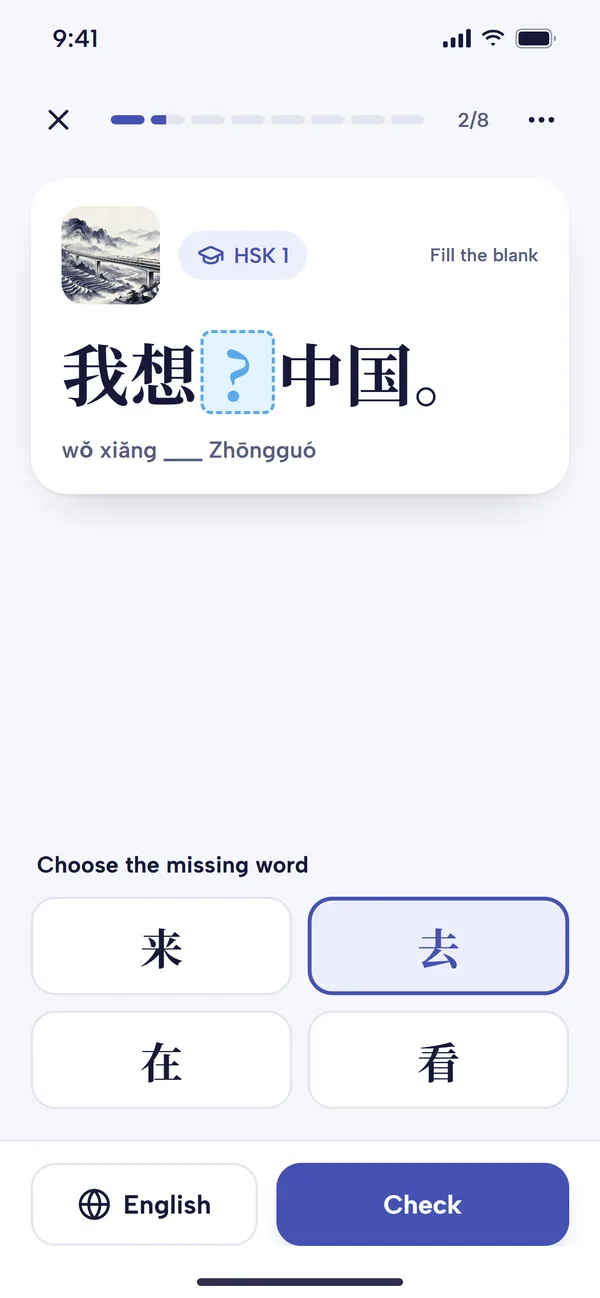
Each screen shows one sentence with a word blanked out. You choose the missing word from four options and tap Check (or, with a setting, type it in characters instead). Then the app tells you whether you were right, shows the word's pinyin and meaning, and plays the sentence.
You can tap any word for its pinyin, meanings, HSK level and audio, and switch it between Learning and Known. That switch matters: the app chooses sentences from what it thinks you know, so the more accurate your vocabulary, the better your lessons. Tap English if you need the translation before answering.
A lesson takes a few minutes and mixes a few new words with words that are due for review. Reviews use spaced repetition: each word comes back just before you're likely to forget it, in a different sentence each time, so you learn the word rather than the card. If you have a favourite scheduler, the review settings let you switch from the app's own to SM-2, FSRS or several others, and set a daily limit.
The Other Features
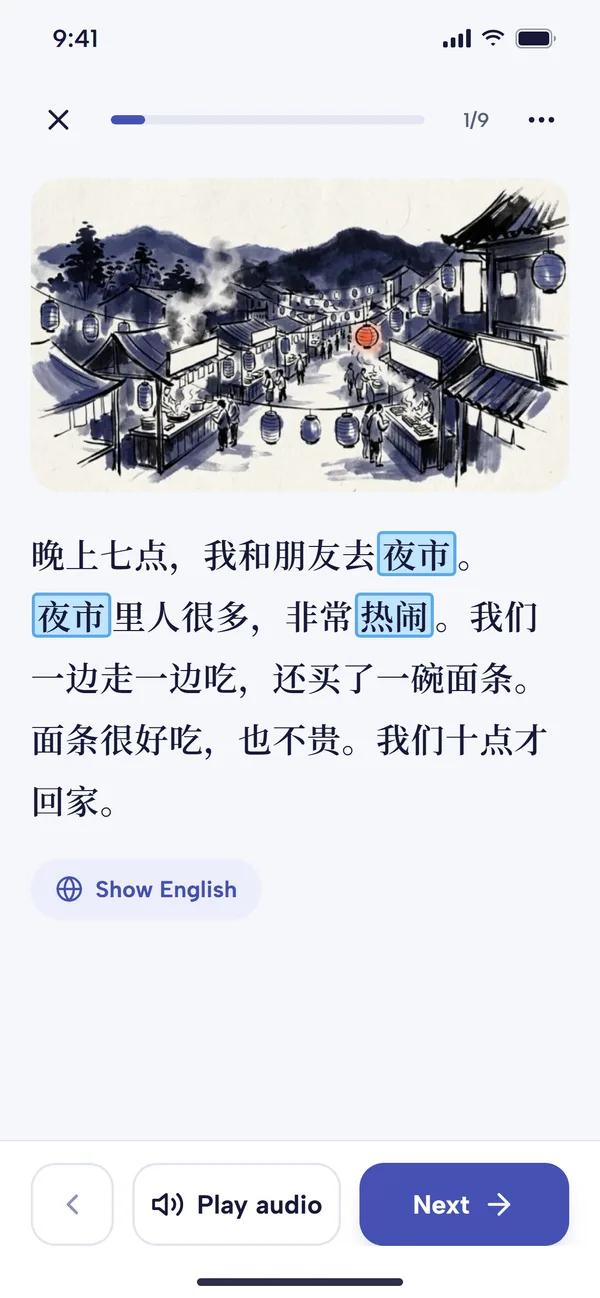
- Chinese Articles: a reader with graded stories for learners and real news for native speakers. Each article shows how many of its words are new to you, so you can pick one at your level, and you can tap any word, play the audio or show the English. Premium users can generate an article from their own prompt or simplify one from a link (see our Chinese Articles guide).
- Listen Later: turns articles into a playlist you can listen to with the screen off, on a walk or a commute.
- Focus Words: words you pick for extra practice, studied in their own focus lessons (see Focus Words).
- Your own sentences: custom packs for sentences you find yourself, and import from Anki decks, CSV or text files (see importing Anki decks).
- Sentence Generator: type any word and it writes an example sentence using words you already know.
- Your Vocabulary and Stats: your progress through each HSK list, level by level, an estimate of your HSK level, and a daily activity chart.
The usage guide walks through all of it with screenshots.
What It Costs
New accounts get a 30-day free trial of everything. After that you can stay on the free plan or pay for Premium. At the time of writing, Premium is £11.95 a month, £9.99 a month billed every three months, or £7.92 a month billed yearly; check pricing for the current prices.
| Feature | Free plan | Premium |
|---|---|---|
| Lessons | 1 a day | Unlimited |
| Focus Words | 10 | Unlimited |
| Custom packs | 1 | Unlimited |
| Custom sentences | 10 | Unlimited |
| Chinese Articles | First five pages of each article | Unlimited, plus article generation |
| Sentence Generator | 10 sentences a day | Unlimited |
| Sync between devices | No | Yes |
The free plan is enough to keep a daily habit going and to decide whether the method suits you. If you want to learn several new words a day, you'll need Premium.
What It Doesn't Do
- No speaking practice. You hear every sentence, but the app never asks you to speak or checks your tones. For that, our sister app Chunking Chinese gives you English prompts to answer out loud and scores each character's tone (see our Chunking Chinese review), or find a language exchange partner.
- No handwriting. It teaches you to read characters, not to write them. If you need to write by hand, add Skritter.
- Phone only. There's no web or desktop version.
- No grammar lessons. You absorb word order and patterns from thousands of sentences, but nothing explains a grammar point the way a textbook does. The free Chinese Grammar Wiki fills that gap well.
- Not a dictionary. You can look up any word inside a lesson or article, but for words you meet in the wild, use Pleco.
- Not a first course in pinyin. Complete beginners can start (there's a No Chinese level and a basics pack), but you'll learn pinyin and tones faster with a short course or our pinyin guide alongside.
How It Compares
We've written separate comparisons, each with the cases where the other app is the better choice:
- Mandarin Mosaic vs Anki: Anki is free on Android and desktop (the iPhone app is paid) and endlessly flexible, but you build or download every card yourself. Mandarin Mosaic does the sentence choosing and scheduling for you.
- Mandarin Mosaic vs Duolingo: Duolingo is better for a free, gamified start; Mandarin Mosaic is better once you need far more vocabulary than a beginner course gives you.
- Mandarin Mosaic vs Clozemaster: both use fill-in-the-blank sentences, but Clozemaster works through a very large bank sorted by word frequency, while Mandarin Mosaic picks sentences to match the words you know.
For the wider field, see our guides to the best Mandarin apps and the best Chinese flashcard apps.
Who Should Use It
It's a good fit if
- you've finished a beginner course or Duolingo and feel stuck at the intermediate plateau
- you're working towards an HSK level and want its vocabulary in sentences, not lists
- you like the idea of sentence mining but don't want to find and format sentences yourself
- you study in short sessions on your phone
Look elsewhere if
- speaking is your main goal: start with a speaking app or a tutor
- you want a structured course that explains grammar as you go, such as HelloChinese or a textbook
- you only study at a computer
- you want everything free and are happy to build your own cards: Anki with a good sentence deck does the job
The Verdict
Mandarin Mosaic does one job well: it turns the slow, fiddly work of sentence mining into a few minutes a day, with sentences pitched at your level and reviews that come back at the right time. It won't make you fluent on its own, because it doesn't train speaking or writing. As the vocabulary and reading part of a routine, alongside some speaking practice, it's what we built it to be. The 30-day trial is long enough to tell whether the one-new-word method suits you.
Frequently Asked Questions
Is Mandarin Mosaic free?
Partly. You get every feature free for 30 days, then a free plan with one lesson a day and limits on custom packs, Focus Words and articles. Premium removes the limits and adds sync.
Does Mandarin Mosaic teach Traditional characters?
Yes. You choose Simplified or Traditional when you start, and you can switch later in Settings.
Can I use my Anki decks in Mandarin Mosaic?
Yes. You can import Anki decks, CSV and text files into your own packs, and the app adds audio and schedules the reviews.
Is there a desktop or web version?
No. Mandarin Mosaic is for iPhone and Android only.